If your DEWALT 20V MAX battery isn’t charging, it can be frustrating, especially when you’re in the middle of a project. This guide provides clear, safe troubleshooting steps to identify common issues and restore your battery’s charging capability.

Get business pricing on tools and workshop supplies
- Business-only prices and quantity discounts
- Tax-exempt purchasing
- Multiple users, one account, clear invoices
Follow these step-by-step instructions to diagnose and resolve charging problems with your DEWALT power tools, ensuring minimal downtime and continued productivity.
Key Takeaways
| Check the charger and power source | Ensure the charger is functioning and plugged into a reliable outlet. |
| Inspect the battery contacts | Clean the contacts to remove dirt or corrosion that may prevent charging. |
| Verify battery condition | Look for physical damage or swelling, which indicate the battery needs replacement. |
| Test with another charger or battery | Rule out charger or battery issues by swapping with known working units. |
| Allow the battery to cool if overheated | Overheating can prevent charging; let it cool down before trying again. |
1. Check the Power Source and Charger
- Ensure the charger is properly plugged into a working outlet. Test the outlet with another device to confirm power.
- Inspect the charger’s LED indicator; it should light up when connected to power.
- Try a different compatible DEWALT charger if available.
2. Inspect and Clean Battery Contacts
- Remove the battery from the charger and the tool.
- Use a dry cloth or a soft brush to gently clean the metal contacts on both the battery and charger.
- Make sure no dirt, debris, or corrosion is blocking the contact points.
3. Assess the Battery Condition
Examine the battery for any visible damage, swelling, or corrosion. If the battery appears damaged or swollen, it should be replaced.
If the battery looks fine, proceed to test with a different charger or battery to isolate the problem.
4. Test with Alternative Equipment
- Use a different DEWALT charger compatible with your battery to see if it charges.
- If possible, try your battery on a different charger or another similar battery on your charger.
- If the battery charges with another charger, the original charger may be faulty. If not, the battery is likely the issue.
5. Allow Overheated Batteries to Cool
If your battery was recently used heavily or in hot environments, it might be overheated. Remove it from the charger and let it cool at room temperature for at least 30 minutes before attempting to recharge.
Overheated batteries may not accept a charge until cooled down, preventing damage and ensuring safety.
The Products in This Guide

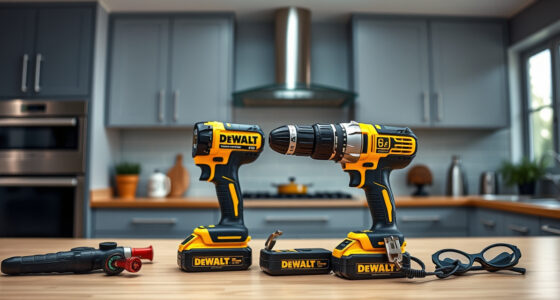
DEWALT 20V MAX Cordless Drill Driver Set
- ✔ LED Light: Yes
- ✔ Speed Settings: 2-speed
- ✔ Includes Battery & Charger: Yes

DEWALT Drill Bit Set
- ✔ Split Point: Yes
- ✔ Application: Plastic, Wood, Metal
- ✔ Web Design: Tapered
DEWALT 20V MAX Cordless Drill Driver Set
The DEWALT 20V MAX Cordless Drill Driver Set is a versatile, lightweight tool with a brushless motor that offers extended run time. Its battery and charger are designed for durability and performance, making it a reliable choice for various tasks.
Pros:
- Brushless motor for longer run time
- Lightweight and ergonomic design
- Includes 2.0 Ah battery and charger
- LED work light for better visibility
Cons:
- Battery may need replacement over time
- Charger can be slow to fully charge batteries
- Limited to 20V MAX system
Best for: General-purpose drilling and fastening in tight spaces
Not ideal for: Heavy-duty industrial applications or extended continuous use
Bottom line: A reliable, lightweight drill ideal for versatile tasks, with dependable battery performance.
DEWALT Drill Bit Set
The DEWALT Drill Bit Set with 14 pieces features high-speed steel bits with a 135-degree split point, designed for durability and precision across plastic, wood, and metal.
Pros:
- Durable high-speed steel
- Prevents walking on start
- Easy size identification
- Corrosion-resistant coating
Cons:
- Limited to specific bit sizes
- Not suitable for heavy-duty drilling
- Requires proper handling to avoid breakage
Best for: Home improvement projects and light to medium drilling tasks
Not ideal for: Heavy industrial applications
Bottom line: A versatile drill bit set perfect for a range of materials and DIY projects.
Frequently Asked Questions
Why isn’t my DEWALT battery charging?
Common causes include a faulty charger, dirty contacts, damaged battery, or overheating. Follow troubleshooting steps to identify the issue.
How do I clean the battery contacts?
Use a dry cloth or soft brush to gently remove dirt, dust, or corrosion from the metal contacts on both the battery and charger.
Can I leave my battery on the charger overnight?
While many DEWALT chargers are designed to prevent overcharging, it’s best to remove the battery once fully charged to prolong battery life.
When should I replace my DEWALT battery?
If the battery no longer holds a charge, shows physical damage, swelling, or corrosion, it’s time for a replacement.
Keep Your DEWALT Power Tools Ready to Work
Regular maintenance, proper handling, and troubleshooting can keep your DEWALT batteries charging smoothly. If issues persist despite troubleshooting, replacing the battery or charger may be necessary. Staying proactive ensures your tools remain reliable for all your projects.
Affiliate disclosure: As an Amazon Associate we earn from qualifying purchases. Prices and availability are accurate as of the time of publishing.
Fall yard work Picks
leaf blowers
As an affiliate, we earn on qualifying purchases.