Among these laser engravers for woodworking, I’d name the xTool S1 40W the best overall for its high-power diode laser, enclosed design, and room to grow into cutting projects. The LONGER Ray5 20W is a more accessible choice for buyers who want stronger wood cutting without stepping up to a premium enclosed system, while the xTool M2 10W stands out for camera-assisted setup and an enclosed workspace. The main tradeoffs are cutting speed and thickness versus price, working area, setup effort, and fume management. Lower-power machines can make detailed engravings on wood but take longer on cuts, while higher power does not remove the need for proper ventilation and fire precautions. Read on for the full comparison and guidance on matching a machine to your projects.

Get business pricing on tools and workshop supplies
- Business-only prices and quantity discounts
- Tax-exempt purchasing
- Multiple users, one account, clear invoices
Complete the kit

Key Takeaways
- The xTool S1 40W is the clearest fit for buyers who expect to engrave and cut wood regularly; its power and enclosure give it a different role from compact open-frame machines.
- The LONGER Ray5 20W and ATOMSTACK A20 Pro V2 bring 20W diode output to wood-focused work without the dual-material approach of the xTool F1 Ultra.
- Camera and enclosure features change day-to-day usability: the BlazeX M3, xTool M2, and ELIDOR give buyers options beyond raw laser power.
- Bundle contents can reduce setup friction but should not decide a purchase alone; compare the included air assist and rotary tools with your actual project needs.
- The ACMER S1 and Twotrees TTS-55 Pro suit lighter engraving tasks better than frequent cutting, while the 10W and 20W machines offer more headroom for varied woodworking.
| xTool F1 Ultra 20W Fiber and Diode Dual Laser Engraver |  | Best for Woodworkers Who Also Engrave Metal | Laser types: 20W fiber and 20W diode | Maximum speed: 10,000 mm/s | Working area: 220 × 220 mm | VIEW LATEST PRICE | See Our Full Breakdown |
| xTool F2 Dual-Laser Engraver with 5W IR and 15W Diode |  | Best Compact Dual-Laser Pick | Laser types: 5W infrared and 15W diode | Maximum speed: 6,000 mm/s | Camera: Built-in 50MP | VIEW LATEST PRICE | See Our Full Breakdown |
| Creality Falcon 10W Laser Engraver and Cutter | 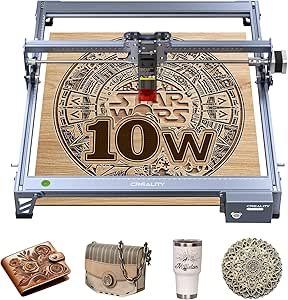 | Best Entry-Level Cutting Pick | Laser output power: 10W | Machine power: 72W | Laser spot size: 0.06 × 0.06 mm | VIEW LATEST PRICE | See Our Full Breakdown |
| LONGER Ray5 20W Laser Engraver and Cutter |  | Best for Large Wood Projects | Laser power: 20W | Working area: 400 × 365 mm | Maximum engraving speed: 24,000 mm/min | VIEW LATEST PRICE | See Our Full Breakdown |
| Longer RAY5 10W Laser Engraver Bundle with Air Assist and 3-in-1 Rotary Roller |  | Best Accessory Bundle for Wood and Cylindrical Work | Laser output power: 10W | Working area: 400 × 400 mm | Maximum engraving speed: 10,000 mm/min | VIEW LATEST PRICE | See Our Full Breakdown |
| BlazeX M3 10W Laser Engraver and Cutter with Smart Camera |  | Best for Camera-Guided Setup | Laser power: 10W | Precision: 0.01 mm | Dimensions: 14.28 × 11.6 × 8.28 inches | VIEW LATEST PRICE | See Our Full Breakdown |
| ELIDOR Laser Engraver and Cutter, 300 × 300 mm, Class 1 Compatible |  | Best Lightweight Large-Format Pick | Model: Z6-6W | Working area: 300 × 300 mm (11.8 × 11.8 in) | Laser spot: 0.04 × 0.14 mm | VIEW LATEST PRICE | See Our Full Breakdown |
| ATOMSTACK A20 Pro V2 20W Laser Engraver and Cutter |  | Best for Higher-Power Open-Frame Work | Laser output power: 20W | Engraving speed: Up to 400 mm/s | Engraving accuracy: 0.01 mm | VIEW LATEST PRICE | See Our Full Breakdown |
| xTool S1 40W Laser Cutter and Engraver with Rotary Bundle |  | Best Premium Enclosed Woodworking Pick | Laser power: 40W | Engraving speed: Up to 600 mm/s | Bed size: 23.93 × 15.16 inches | VIEW LATEST PRICE | See Our Full Breakdown |
| ACMER S1 2500 mW Laser Engraver and Cutter |  | Best Compact Starter for Small Wood Pieces | Laser power: 2500 mW | Machine output: 24 W | Wavelength: 455 ± 5 nm | VIEW LATEST PRICE | See Our Full Breakdown |
| Creality Falcon 10W Laser Engraver and Cutter with Air Assist and Rotary Roller |  | Best for Woodworkers Who Also Engrave Round Objects | Laser output power: 10W | Laser class: Class 4 | Laser spot size: 0.06 mm | VIEW LATEST PRICE | See Our Full Breakdown |
| xTool M2 10W Enclosed Laser Engraver with Dual Cameras |  | Best for Beginners Prioritizing Enclosed Operation | Laser power: 10W diode | Safety class: Class 1 | Cameras: Dual built-in cameras | VIEW LATEST PRICE | See Our Full Breakdown |
| Twotrees TTS-55 Pro 5.5W Laser Engraver |  | Best Value for Small Wood Projects | Laser power: 5.5W | Work area: 300 × 300 mm | Laser spot size: 0.08 × 0.46 mm | VIEW LATEST PRICE | See Our Full Breakdown |
| xTool M2 10W Color Craft Laser Engraver with CMYK Inkjet Printer |  | Best for Color-Printed Wood Projects | Laser output power: 10W | Printer: CMYK inkjet | Cameras: Dual built-in cameras | VIEW LATEST PRICE | See Our Full Breakdown |
| Carverall K15 Pro 10W Laser Engraver and Cutter |  | Best Compact 10W Pick | Laser power: 10W | Work area: 11.8 × 7.9 inches | Precision: 0.01 mm | VIEW LATEST PRICE | See Our Full Breakdown |
More Details on Our Top Picks
xTool F1 Ultra 20W Fiber and Diode Dual Laser Engraver
For woodworking shops that also personalize metal hardware, the xTool F1 Ultra is the most versatile material option here. Its 20W diode laser handles wood, while the separate 20W fiber laser is suited to metal marking—something the wood-focused Creality Falcon 10W does not offer in the same way. A 16MP camera and 220 × 220 mm work area help with positioning small signs, tags, and batch jobs; the optional conveyor extends that area for repeated pieces. Its speed and enclosed design are useful for production, but this is a heavier, more involved machine than an open-frame engraver. The conveyor costs extra, and its Class 4 laser rating calls for careful safety practices. Choose it for mixed-material work, not as the simplest route to occasional wood engraving.
Pros:- 20W diode laser supports wood engraving alongside a 20W fiber laser for metal marking.
- 16MP camera supports precise placement and repeatable batch work.
- Optional conveyor expands the working area to 220 × 500 mm.
- Enclosure, smoke extraction, fire alarm, and emergency stop provide multiple safety features.
Cons:- Auto Conveyor is sold separately, adding a separate purchase for expanded batch capacity.
- Class 4 laser classification requires careful operating and safety practices.
- At 43.8 pounds, it is less convenient to move than lighter open-frame options such as the Creality Falcon 10W.
Best for: Woodworkers who regularly personalize wooden products and also need to mark metal tools, fittings, or branded tags.
Not ideal for: Hobbyists focused only on wood signs or occasional small projects who do not need a fiber laser, conveyor workflow, or Class 4 setup.
- Laser types:20W fiber and 20W diode
- Maximum speed:10,000 mm/s
- Working area:220 × 220 mm
- Expanded working area:220 × 500 mm with optional Auto Conveyor
- Camera:16MP
- Laser class:Class 4
- Item weight:43.8 pounds
- Warranty:1 year
Our verdict“Choose the F1 Ultra if your woodworking business also needs fast, camera-assisted metal marking; skip it if wood is your only material.”
xTool F2 Dual-Laser Engraver with 5W IR and 15W Diode
The xTool F2 suits woodworkers who need a compact desktop machine for detailed personalization rather than large panels. Its 15W diode laser handles wood, while the 5W infrared laser adds metal-marking capability; that pairing makes it a smaller, more space-conscious alternative to the larger xTool F1 Ultra, though the F1 Ultra has more diode power and a stated 220 × 220 mm work area. The F2’s 50MP camera and alignment accuracy up to 0.1 mm are useful when placing artwork on small blanks or repeating designs. It arrives assembled and includes material presets, lowering setup friction. The tradeoff is a compact footprint that limits project scale, while a purifier and batch-processing accessories are optional. The listed weight also differs between product details, so portability claims deserve caution.
Pros:- 15W diode and 5W infrared lasers cover wood engraving and metal marking.
- 50MP camera and up-to-0.1 mm alignment accuracy support careful placement on small pieces.
- Arrives assembled and includes material presets for a faster start.
- Enclosed design supports a more contained desktop workflow.
Cons:- Compact format is less suited to large wood panels than the LONGER Ray5 models with 400 mm work areas.
- Purifier and batch-processing accessories are optional.
- Product details give conflicting weights of 4.6 kg and 10 lb.
Best for: Small-shop makers and home woodworkers who personalize compact blanks and want one enclosed machine for wood and metal marking.
Not ideal for: Buyers engraving wide boards or larger batches who need a clearly specified, roomy work area or built-in batch accessories.
- Laser types:5W infrared and 15W diode
- Maximum speed:6,000 mm/s
- Camera:Built-in 50MP
- Alignment accuracy:Up to 0.1 mm
- Motion accuracy:0.00199 in
- Dimensions:6.89 × 9.33 in
- Weight:4.6 kg in description; 10 lb in item details
- Warranty:1 year
Our verdict“Pick the F2 for compact, camera-aligned wood and metal personalization, but choose a larger Ray5 if your projects need more work area.”
Creality Falcon 10W Laser Engraver and Cutter
The Creality Falcon 10W is a practical choice for woodworkers who want to move beyond surface marking into small-part cutting. Its stated ability to cut 5mm basswood in one pass gives it a clear role against the LONGER Ray5 20W, which offers more laser power and a larger work area but may still need multiple passes for some cuts. The Falcon’s 0.06 × 0.06 mm spot supports fine detail, and compatibility with LightBurn and LaserGRBL gives users flexibility in workflow. Wi-Fi, USB, and SD card transfers also suit different shop setups. This is an open-frame machine rather than an enclosed desktop unit, and assembly is required. Its 10W output and stated cutting capacity are better matched to thinner stock and smaller projects than frequent cutting of thick hardwood.
Pros:- Stated one-pass cutting capacity of 5mm basswood suits small wood components.
- 0.06 × 0.06 mm laser spot supports fine engraving detail.
- Works with both LightBurn and LaserGRBL.
- Wi-Fi, USB, and SD card options allow flexible file transfer.
Cons:- Assembly is required before use.
- 10W output is less suited to repeated cutting of thick stock than higher-power options such as the LONGER Ray5 20W.
- Open-frame design offers less containment than the enclosed xTool F2.
Best for: Woodworking hobbyists who want to engrave designs and cut small parts from thin basswood using familiar desktop laser software.
Not ideal for: Shops that routinely cut thicker hardwood, need a fully enclosed machine, or want a ready-to-run setup with minimal assembly.
- Laser output power:10W
- Machine power:72W
- Laser spot size:0.06 × 0.06 mm
- Cutting capacity:5mm basswood or 3mm black acrylic in one pass
- Maximum speed:10,000 mm/min
- Connectivity:Wi-Fi, USB, SD card
- Software compatibility:LightBurn, LaserGRBL
- Warranty:1 year
Our verdict“Choose the Falcon 10W for detailed hobby engraving and thin-basswood cuts, but look to a higher-power or enclosed machine for heavier shop work.”
LONGER Ray5 20W Laser Engraver and Cutter
Among these five, the LONGER Ray5 20W is the clearest fit for woodworkers who need a broad work surface for signs, panels, and multi-piece layouts. Its 400 × 365 mm area is substantially larger than the xTool F1 Ultra’s 220 × 220 mm bed, while the 20W laser offers more cutting headroom than the Creality Falcon 10W. A stated maximum speed of 24,000 mm/min and support for LightBurn, LaserGRBL, and LaserBurn give it a flexible workflow across project types. The touchscreen and USB, TF card, Wi-Fi, and app controls add ways to run jobs. The compromises are practical: some cuts need multiple passes, and the protective enclosure can restrict access when a project is oversized. It is a strong large-format wood option, but not the pick for unrestricted workpiece dimensions.
Pros:- 400 × 365 mm work area accommodates larger wood layouts than the xTool F1 Ultra.
- 20W laser power provides more cutting headroom than the Creality Falcon 10W.
- Supports LightBurn, LaserGRBL, and LaserBurn.
- Includes enclosure, safety goggles, emergency stop, and overheating protection.
Cons:- Some cutting jobs require multiple passes.
- Protective enclosure can limit access for larger or awkwardly shaped workpieces.
- The listed 24,000 mm/min maximum speed does not by itself indicate cutting performance across different wood types and thicknesses.
Best for: Woodworkers making larger signs, panels, and batches who want a 20W laser, a 400 mm-class bed, and multiple control options.
Not ideal for: Makers whose workpieces exceed the enclosure’s usable access or who need consistently fast, single-pass cutting through thicker stock.
- Laser power:20W
- Working area:400 × 365 mm
- Maximum engraving speed:24,000 mm/min
- Laser spot size:0.08 × 0.1 mm
- Engraving precision:Up to 0.01 mm
- Touchscreen:3.5 inches
- Connectivity:USB, TF card, Wi-Fi, app
- Compatible software:LaserGRBL, LightBurn, LaserBurn
Our verdict“Choose the Ray5 20W for larger wood layouts and higher laser power, but skip it if your projects need open access for oversized stock.”
Longer RAY5 10W Laser Engraver Bundle with Air Assist and 3-in-1 Rotary Roller
This Longer RAY5 10W bundle makes sense for woodworkers who want a generous engraving area and accessories for more than flat stock. The 400 × 400 mm work area matches or exceeds the Ray5 20W’s footprint, while the included 3-in-1 rotary roller opens up cylindrical projects such as handled items and round keepsakes. Air assist can help manage smoke and debris during wood engraving and cutting, and the riser stands give added clearance for certain setups. Compared with the more powerful Ray5 20W, this version trades laser output for a fuller included accessory package and a slightly wider, square work area. It runs at up to 10,000 mm/min and requires assembly, so buyers prioritizing faster work or more cutting headroom should choose the 20W model instead.
Pros:- 400 × 400 mm work area handles broad layouts and larger pieces.
- Included 3-in-1 rotary roller supports cylindrical engraving without sourcing a separate rotary accessory.
- Adjustable 10–30 L/min air assist supports smoke and debris management.
- Includes riser stands, protective cover, and safety goggles.
Cons:- 10W laser output offers less cutting headroom than the Ray5 20W.
- Assembly is required.
- The stated 24/7 operating claim depends on operating conditions and should not be treated as a guarantee for every workload.
Best for: Woodworking hobbyists who want to engrave large flat pieces and cylindrical projects, with air assist and rotary hardware included.
Not ideal for: Makers prioritizing cutting thicker wood or faster production, since this 10W model offers less laser power than the LONGER Ray5 20W.
- Laser output power:10W
- Working area:400 × 400 mm
- Maximum engraving speed:10,000 mm/min
- Touchscreen:3.5-inch color touchscreen
- Connectivity:USB, TF card, Wi-Fi, app
- Air assist airflow:10–30 L/min adjustable
- Included accessories:3-in-1 rotary roller, air pump, 8 riser stands, protective cover, safety goggles
- Item weight:18.31 lbs
Our verdict“Pick this bundle for broad wood layouts and included rotary capability; choose the Ray5 20W if cutting power matters more than bundled accessories.”
BlazeX M3 10W Laser Engraver and Cutter with Smart Camera
The BlazeX M3 is a good fit for woodworkers who want help placing artwork accurately without stepping up to a larger, more powerful machine. Its smart camera previews design placement, which can make positioning marks and names on individual wood pieces less fiddly. The 10W laser supports both engraving and cutting, while the included enclosure, honeycomb bed, tools, and sample materials give a new owner a fuller starting setup than the bare-bones ACMER S1.
The tradeoff is that useful additions such as air assist, a rotary roller, risers, and a purifier are optional, so the included bundle does not cover every kind of woodworking project. Its stated 0.01 mm precision is not a guarantee of finished engraving quality, and cutting performance details are not provided. I would pick it over the more powerful ATOMSTACK A20 Pro V2 for camera-assisted placement and bundled safety gear, not for raw power.
Pros:- Camera-guided placement helps position designs on wood before engraving.
- 10W laser supports both engraving and cutting.
- Includes an enclosure, honeycomb bed, tools, and 13 engraving materials.
- Automatic stop sensors respond if the lid opens or the machine tilts.
Cons:- Air assist, rotary roller, risers, and purifier are optional upgrades.
- No cutting thickness or independently verified cutting performance is provided.
- The listed bundle does not describe noise levels or exhaust performance.
Best for: Woodworkers making small personalized signs, tags, or gifts who value camera-assisted placement and an included enclosure.
Not ideal for: Buyers who need a specified cutting capacity, air assist in the box, or a rotary setup for cylindrical work.
- Laser power:10W
- Precision:0.01 mm
- Dimensions:14.28 × 11.6 × 8.28 inches
- Weight:14.97 lbs
- Included accessories:Smart camera, enclosure, honeycomb bed, tool kit, and 13 engraving materials
- Software:LightBurn, LaserGRBL, and CutLabX
- Operating systems:Windows, macOS, iOS, and Android
- Safety features:Class 1 rating, smoke exhaust fan, and automatic stop sensors
Our verdict“Choose the BlazeX M3 if camera-assisted placement and an included enclosure matter more than maximum laser power or bundled air assist.”
ELIDOR Laser Engraver and Cutter, 300 × 300 mm, Class 1 Compatible
The ELIDOR’s main woodworking advantage is its 300 × 300 mm work area: it can accommodate broader panels and batches of smaller pieces that would need to be repositioned on the compact ACMER S1. At just 4.7 pounds, it is also easier to move between a desk and a storage spot than the heavier xTool S1 40W. Its stated speed of up to 10,000 mm/min and compatibility with LightBurn and LaserGRBL give experienced makers familiar control options.
This is a less complete safety setup than an enclosed machine. The listing says a compatible enclosure is needed to create a Class 1 laser system, so buyers need to plan for that addition rather than treating the machine itself as fully enclosed. The model is listed as 6W, and the provided details do not specify wood-cutting thickness; its wide bed should not be mistaken for high cutting power. I’d choose it for portable, larger-area engraving, not for a ready-to-run enclosed workshop setup.
Pros:- 300 × 300 mm work area suits larger panels and batch engraving.
- Light 4.7-pound design is easy to move and store.
- Supports LightBurn and LaserGRBL on Windows, macOS, and Linux.
- Works with common image and vector file formats.
Cons:- A compatible enclosure is needed to create a Class 1 laser system.
- The listed 6W model has no stated wood-cutting thickness.
- Maximum speed and accuracy figures do not establish finished wood quality or cutting performance.
Best for: Makers who engrave wider wood panels or batches, want a lightweight frame, and are comfortable sourcing a compatible enclosure.
Not ideal for: Beginners seeking an enclosed machine out of the box or woodworkers whose main need is cutting thicker stock.
- Model:Z6-6W
- Working area:300 × 300 mm (11.8 × 11.8 in)
- Laser spot:0.04 × 0.14 mm
- Engraving accuracy:Up to 0.01 mm
- Maximum speed:10,000 mm/min
- Weight:2.13 kg (4.7 lbs)
- Software:LaserGRBL and LightBurn
- Operating systems:Windows, macOS, and Linux
- Materials:Wood, leather, acrylic, cardboard, ceramic, glass, and metal
Our verdict“Pick the ELIDOR for a portable, generous engraving area, provided you are prepared to add suitable laser protection.”
ATOMSTACK A20 Pro V2 20W Laser Engraver and Cutter
For woodworkers who prioritize laser power in an open-frame machine, the ATOMSTACK A20 Pro V2 stands apart from the 10W BlazeX M3. Its 20W output and stated speed of up to 400 mm/s make it the more power-focused option in this group, while its aluminum alloy frame is designed for a durable, modular setup. LightBurn and LaserGRBL support also make it easier to use familiar workflows rather than depend on a single control program.
The tradeoff is that the listing gives no work area or cutting thickness, two details that matter when sizing wood projects and estimating what the machine can cut. Its removable magnetic cover and included safety glasses are not the same as the fully enclosed format of the xTool S1 40W. Limit switches and a tilt alert add safeguards, but buyers should plan their workspace and ventilation carefully. I’d favor this ATOMSTACK for power-focused engraving and cutting, while the xTool is better documented for large, enclosed production work.
Pros:- 20W laser output is higher than the 10W BlazeX M3 and ACMER S1.
- Supports ATOMSTACK software, LightBurn, and LaserGRBL.
- Aluminum alloy frame is designed for a modular, durable build.
- Includes limit switches, a removable magnetic protective cover, and a tilt-angle alert.
Cons:- The provided product details do not specify work area or cutting thickness.
- Protective cover and glasses do not offer the same enclosure format as the xTool S1 40W.
- The listed warranty is one year.
Best for: Woodworkers with an established, ventilated workspace who want a 20W open-frame diode machine and control-software flexibility.
Not ideal for: Buyers who need a confirmed work area, stated wood-cutting thickness, or a fully enclosed machine included in the setup.
- Laser output power:20W
- Engraving speed:Up to 400 mm/s
- Engraving accuracy:0.01 mm
- Frame material:Aluminum alloy
- Connectivity:Type-C and USB
- Compatible software:ATOMSTACK App/PC software, LightBurn, and LaserGRBL
- Safety features:Limit switches, removable magnetic protective cover, safety glasses, and tilt-angle beep above 15°
- Weight:13.67 pounds
- Warranty:1 year
Our verdict“Choose the A20 Pro V2 if you want higher listed laser power in an open-frame machine and can work around the missing capacity details.”
xTool S1 40W Laser Cutter and Engraver with Rotary Bundle
The xTool S1 40W is the strongest fit here for woodworkers handling larger pieces or repeated jobs who want an enclosed machine. Its 40W laser, 23.93 × 15.16-inch bed, and stated speeds up to 600 mm/s make it a more capable large-project proposition than the 20W ATOMSTACK A20 Pro V2, whose listing omits both bed size and cutting thickness. Autofocus can reduce setup work when changing material height, and the included rotary bundle adds a route to engraving suitable cylindrical items.
That capability comes with a substantial footprint and an 86.8-pound weight, so this is not the easy-to-store choice; the compact ACMER S1 is much easier to move, but has a far smaller work area and lower listed laser power. The enclosure, flame sensors, and emergency stop are meaningful advantages for a home workshop, though they do not remove the need to follow operating and ventilation guidance. The listed product dimensions are unusually shallow, so I would confirm the machine’s required bench space before purchase.
Pros:- 40W laser power and a large 23.93 × 15.16-inch bed suit larger wood projects.
- Autofocus can simplify setup when material height changes.
- Rotary engraving capability is included in the bundle.
- Enclosed design includes flame sensors and an emergency stop.
Cons:- At 86.8 pounds, it is difficult to move or store compared with compact machines such as the ACMER S1.
- The listed product dimensions appear unusually shallow and should be checked against the required workspace.
- The product details do not state a specific wood-cutting thickness.
Best for: Woodworking shops producing larger signs, panels, or repeat projects that benefit from an enclosed 40W machine and rotary capability.
Not ideal for: Makers with limited bench space, frequent transport needs, or small-project workloads that do not justify an 86.8-pound machine.
- Laser power:40W
- Engraving speed:Up to 600 mm/s
- Bed size:23.93 × 15.16 inches
- Weight:86.8 pounds
- Safety class:Class 1
- Safety features:Flame sensors and emergency stop
- Included capabilities:Autofocus, xTool Creative Space software, and rotary engraving
- Power source:Corded electric
- Model number:MXD-K101-001
Our verdict“Choose the xTool S1 40W if you need a large, enclosed machine for substantial woodworking projects and have room for its heavy chassis.”
ACMER S1 2500 mW Laser Engraver and Cutter
The ACMER S1 makes the most sense when a woodworking project is small enough to fit its 130 × 130 mm work area. It is a compact, 2 kg machine with a stated 0.01 mm repeatable positioning accuracy, and it arrives 99% preassembled; compared with the larger ELIDOR, it sacrifices working area in exchange for a smaller footprint and easier storage. Its support for Acmerstudio, LightBurn, and LaserGRBL across Windows, macOS, and Linux gives beginners and experienced makers several ways to prepare designs.
The limited bed is the main constraint: larger signs and panels will need another machine, such as the ELIDOR with its 300 × 300 mm area. The laser head still needs installation, and the product is listed as Class 4, so it is not the enclosed, ready-protected choice represented by the xTool S1 40W. The specifications distinguish 2500 mW laser power from 24W machine output; buyers should not read the latter as laser output. I’d choose this for small wood accents, not production cutting or large-format work.
Pros:- Compact 130 × 130 mm work area suits small projects and takes little bench space.
- Arrives 99% preassembled, with only the laser head requiring installation.
- Supports Acmerstudio, LightBurn, and LaserGRBL.
- Compatible with Windows, macOS, and Linux and common image and vector formats.
Cons:- Small work area limits panel, sign, and batch sizes compared with the ELIDOR.
- Class 4 certification means this is not the enclosed Class 1 setup offered by the xTool S1 40W.
- The laser head must be installed before use, and the listed laser power is 2.5W.
Best for: Beginners and hobbyists engraving small wood tags, ornaments, or sample pieces who need a compact machine and broad software compatibility.
Not ideal for: Woodworkers making large signs or cutting substantial stock, or buyers who want an enclosed laser setup without additional safety planning.
- Laser power:2500 mW
- Machine output:24 W
- Wavelength:455 ± 5 nm
- Working area:130 × 130 mm
- Maximum engraving speed:10,000 mm/min
- Repeatable positioning accuracy:0.01 mm
- Weight:2 kg (manufacturer); 3.98 lb (product information)
- Software compatibility:Acmerstudio, LightBurn, and LaserGRBL
- Laser certification:Class 4; IEC 60825-1 compliant
Our verdict“Pick the ACMER S1 for compact, small-format wood engraving and skip it if your projects need a broad bed or higher laser output.”
Creality Falcon 10W Laser Engraver and Cutter with Air Assist and Rotary Roller
The 10W diode and included adjustable air assist make this a versatile choice for engraving wood and cutting stock up to a stated 12 mm in one pass. Airflow helps clear smoke from the engraving area, which can reduce scorch marks on wood; it does not remove the need to tune settings for each material. Its standout advantage over the Twotrees TTS-55 Pro is the included rotary kit, which supports cylinders, spheres, and rings for projects beyond flat boards. The tradeoff is a Class 4 laser, which calls for careful safety practices, and the rotary setup has its own instructions to follow. I’d choose it when shaped wooden pieces and broader cutting capacity matter more than a simpler, lower-power machine.
Pros:- Included adjustable air assist can help clear smoke and reduce scorching on wood.
- Rotary kit supports cylinders, spheres, and rings.
- 10W output and stated one-pass capacity of up to 12 mm wood suit cutting as well as engraving.
- Supports LaserGRBL and LightBurn, plus TF card offline creation.
Cons:- Class 4 laser requires careful handling and adherence to safety instructions.
- Assembly and rotary setup require consulting separate manuals.
Best for: Woodworkers who want to engrave flat pieces as well as cylindrical, spherical, or ring-shaped items using an included rotary kit.
Not ideal for: Beginners looking for a more contained setup; the Class 4 laser and separate rotary instructions call for careful handling and setup.
- Laser output power:10W
- Laser class:Class 4
- Laser spot size:0.06 mm
- Maximum speed:10,000 mm/min
- Cutting capacity:Up to 12 mm wood or 3 mm black acrylic in one pass
- Rotary object support:Cylinders, spheres, and rings; size ranges vary by object type
- Software and operating systems:LaserGRBL and LightBurn; Windows and macOS
- Dimensions and weight:17.32 × 9.33 × 24.8 inches; 20.1 lb
Our verdict“Choose this Creality if you want 10W wood cutting plus an included rotary for shaped work; skip it if a Class 4 setup is more than you want to manage.”
xTool M2 10W Enclosed Laser Engraver with Dual Cameras
For woodworking beginners who value a contained machine and easier placement, the Class 1 enclosure and dual cameras are the M2’s defining advantages. The cameras preview the work area and help position designs on wood, reducing the guesswork that can lead to misplaced engravings or wasted blanks. Compared with the open-frame Twotrees TTS-55 Pro, this xTool gives more emphasis to enclosure and guided workflow than a larger stated work area or wireless control. Its 10W diode also handles a range of craft materials, though the product data does not specify a wood cutting depth. Rotary work and fine engraving on metal or plastic require optional modules, so the base machine is a less complete fit for buyers who want those capabilities immediately. I’d pick it for supervised craft spaces and repeatable placement, not for maximum wood-cutting flexibility.
Pros:- Enclosed Class 1 design offers a more contained setup than the open-frame Twotrees TTS-55 Pro.
- Dual cameras assist with workspace preview and project placement.
- 10W diode works with wood and several other craft materials.
- Beginner-friendly software includes templates and an AI image generator.
Cons:- Rotary, CMYK printing, and 3W IR engraving modules are sold separately.
- Product data does not state a wood cutting depth, limiting cutting comparisons.
- At 36.2 lb, it is less convenient to move than compact open-frame options.
Best for: New wood-craft makers who want an enclosed Class 1 machine, camera-assisted placement, and software templates for small projects.
Not ideal for: Buyers who need an included rotary, metal engraving, or a stated wood cutting capacity; those functions require add-ons or are unspecified here.
- Laser power:10W diode
- Safety class:Class 1
- Cameras:Dual built-in cameras
- Compatible materials:Cardstock, felt, leather, wood, fabric, and paper
- Optional modules:CMYK inkjet, 3W IR laser, and RA3 Lite Rotary; sold separately
- Included items:xTool M2 machine and base material kit
- Item weight:36.2 lb
- Model number:MLM-K610-001
Our verdict“Pick the M2 for camera-guided wood projects in an enclosed setup, but choose another model if included rotary capability or a documented cutting depth is a priority.”
Twotrees TTS-55 Pro 5.5W Laser Engraver
The TTS-55 Pro is the more modest-power option in this group, but its 300 × 300 mm work area gives small woodworking projects room to spread out. Its 5.5W laser is a better match for engraving and cutting thinner stock than for demanding cuts: the listed plywood capacity is 5 mm, well below the 10W Creality Falcon’s stated 12 mm wood capacity. Air-assist support and a red laser shield add practical features, while Wi-Fi and TF card control offer flexibility for running jobs. Compared with the compact Carverall K15 Pro, the Twotrees has a larger stated work area, but less laser power and lower listed cutting capacity. I’d favor it for signs, tags, and thin plywood when workspace matters more than cutting thicker material.
Pros:- 300 × 300 mm work area accommodates a range of small wood projects.
- Air-assist support and a red laser shield are included.
- Wi-Fi, online control, and TF card offline engraving give several workflow options.
- Compatible with LaserGRBL and LightBurn.
Cons:- Listed plywood cutting capacity is limited to 5 mm.
- The 5.5W laser is less suited to demanding cuts than the 10W Creality Falcon or Carverall K15 Pro.
- The product data lists a 300 × 300 mm work area but gives no rotary attachment.
Best for: Woodworkers making small signs, tags, and shallow engravings who want a 300 × 300 mm work area and wireless or offline control.
Not ideal for: Makers who regularly cut thick plywood or need a documented capacity beyond 5 mm plywood; the 5.5W output is the limiting factor.
- Laser power:5.5W
- Work area:300 × 300 mm
- Laser spot size:0.08 × 0.46 mm
- Maximum engraving speed:30,000 mm/min
- Engraving accuracy:Up to 0.1 mm
- Cutting capacity:5 mm plywood, 3 mm acrylic, or 0.7 mm leather
- Connectivity:Wi-Fi, online control, and TF card offline engraving
- Software:LaserGRBL and LightBurn
Our verdict“Choose the TTS-55 Pro for a flexible work area and thin-stock woodworking, not for deeper cuts that call for a 10W machine.”
xTool M2 10W Color Craft Laser Engraver with CMYK Inkjet Printer
This M2 pairs a 10W diode laser with a CMYK inkjet module, making it the clear fit for woodworkers who want printed color alongside engraving and cutting. The dual cameras support placement and print-to-cut work, while the enclosed Class 1 design provides a more contained workflow than open-frame machines such as the Twotrees TTS-55 Pro. The practical distinction from the standard xTool M2 is that this package includes the CMYK module and a deluxe material kit; it is not simply the same base machine with an extra capability left to buy later. That expanded workflow adds complexity, and buyers interested only in monochrome wood engraving may get little benefit from the printer. Fine metal engraving still requires the separately sold 3W IR module, so this package is strongest for colorful craft pieces rather than metal work.
Pros:- Combines 10W laser engraving and cutting with CMYK inkjet printing.
- Dual cameras support workspace preview and precise placement.
- Enclosed Class 1 design offers a more contained workflow than open-frame machines.
- Includes a deluxe material kit, templates, and an AI image generator in the software.
Cons:- The added printer may be unnecessary for buyers focused only on wood engraving.
- Bare-metal engraving requires the separately sold 3W IR laser module.
- Product data does not specify a wood cutting depth.
Best for: Wood crafters producing personalized signs, gifts, or mixed-media projects that benefit from full-color printing and camera-assisted placement.
Not ideal for: Woodworkers focused on straightforward monochrome engraving or cutting who do not need CMYK printing, or buyers who need metal engraving without an add-on.
- Laser output power:10W
- Printer:CMYK inkjet
- Cameras:Dual built-in cameras
- Safety class:Class 1 enclosed design
- Compatible materials:Cardstock, felt, leather, wood, fabric, and paper
- Included package:xTool M2 10W, CMYK Inkjet Printing Module, and Deluxe Material Kit
- Optional module:3W IR laser; sold separately
- Item weight:36.7 lb
Our verdict“Choose this M2 package when color printing is part of your woodworking workflow; for engraving alone, the standard M2 is the simpler fit.”
Carverall K15 Pro 10W Laser Engraver and Cutter
The K15 Pro offers 10W output in an A4-sized work area, a useful balance for woodworkers who want more cutting headroom than the Twotrees TTS-55 Pro without stepping up to a larger work surface. Its stated multi-pass capacity reaches 12 mm plywood, so buyers should expect thicker cuts to take several passes rather than happen in one. The 0.01 mm precision and saved-file repeat jobs suit batches of matching wooden tags or small keepsakes, while app, computer, and TF card controls make it less tied to one workflow. The compact footprint is also a clear contrast with the enclosed xTool M2, though this Carverall does not offer its cameras or Class 1 enclosure. Bare-metal engraving needs an optional IR head. I’d choose it for repeatable, small-format woodwork, not large panels or quick deep cuts.
Pros:- 10W laser output in a compact 11.8 × 7.9-inch work area.
- Supports app, computer software, and TF card control.
- One-touch focus and saved-file repeat jobs support consistent small batches.
- Listed multi-pass cutting capacity reaches 12 mm plywood.
Cons:- The A4-sized work area limits the size of wood pieces it can handle.
- Thicker material requires multiple passes, extending cutting jobs.
- Bare-metal engraving requires an optional 1W IR laser head.
Best for: Makers producing small wooden signs, tags, and repeat batches who want 10W output, compact dimensions, and app or offline control.
Not ideal for: Woodworkers handling large panels or expecting thick plywood cuts in one pass; its work area is compact and thicker cuts require multiple passes.
- Laser power:10W
- Work area:11.8 × 7.9 inches
- Precision:0.01 mm
- Maximum speed:15,000 mm/min
- Multi-pass cutting capacity:Up to 12 mm plywood and 8 mm acrylic
- Control options:App, computer software, and TF card
- Supported materials:300+ materials, including wood, acrylic, leather, and coated metal
- Warranty and support:1-year warranty and lifetime technical support
Our verdict“Pick the K15 Pro for compact, repeatable 10W wood projects, but choose a larger-format machine for panels or faster thick-stock cutting.”
How We Picked
I compared these 15 machines through the needs of woodworkers: engraving detail, practical cutting capacity, work area, ease of positioning projects, included accessories, and the effort needed to operate and maintain the machine. I also weighed enclosure and camera features because they affect workflow and help contain or manage the work area, though they do not replace suitable extraction, supervision, or fire safety.
The ranking favors machines that offer a useful balance for a range of wood projects, rather than simply rewarding the highest wattage. The xTool S1 40W leads for its combination of power and enclosed format; 20W diode options follow for buyers who want more cutting headroom at a less specialized level. Compact, lower-power, and mixed-material models rank according to their narrower strengths, such as detailed engraving, camera-guided placement, or non-wood material flexibility, and their limitations for woodworking.
Factors to Consider When Choosing Laser Engravers For Woodworking
For woodworking, the right engraver depends less on the broadest feature list than on the wood, project size, and frequency of use. I’d settle the following questions before choosing a machine.
Choose Power for Your Most Demanding Wood Job
Start with the thickest material you expect to cut, not the occasional coaster you plan to mark. A lower-power diode can produce fine engravings on wood, but cuts generally need more passes and careful setup than a more powerful machine. That adds time and can increase charring, especially on dense or inconsistent stock. If most of your work is lettering, logos, or surface decoration, buying a high-power cutter may bring little practical benefit. For repeat cutting, signs, or thicker blanks, extra power can make a meaningful workflow difference. Treat advertised power as one part of the decision and check the maker’s guidance for your specific material and setup.
Match the Work Area to Your Stock
A large work area is useful only if your typical pieces fit it and the machine can hold them securely. Measure your largest boards, panels, and batches before choosing a frame size, including space needed for clamps or a rotary attachment. Small machines can be easier to store and set up, but they may force you to reposition long workpieces or split a design. Repositioning can introduce alignment errors, especially on continuous patterns. If you mainly make small tags and ornaments, a compact bed may be the sensible choice. For furniture details, long signs, or batch work, prioritize usable clearance and a practical method for holding stock.
Plan for Smoke, Dust, and Fire Safety
Wood engraving creates smoke and fine residue, so plan where fumes will go before the machine arrives. An enclosure can help contain the work area, but it does not automatically provide effective extraction; check what ventilation equipment is included and what you will need to add. Air assist can help clear smoke from the engraving zone and reduce scorching, but it is not a substitute for supervision or a safe workspace. Keep combustible materials away from the machine and never leave a laser running unattended. A garage or workshop with a suitable exhaust path may be easier to manage than a small shared room. Factor extraction, cleaning, and fire precautions into the purchase rather than treating them as later accessories.
Decide Whether Cameras and Enclosures Fit Your Workflow
Camera positioning features can make it easier to place artwork on irregular blanks or use the remaining space on a board. They are most useful when you regularly change stock sizes or need repeatable placement, not necessarily for a fixed batch of identical parts. Enclosed machines can add a more contained work area and may suit home workshops, but they can occupy more bench space and still need thoughtful fume handling. Open-frame designs offer easier access to larger or awkward pieces, though the operator must pay close attention to shielding and workspace safety. Do not pay extra for a camera if your designs are simple and you can position stock reliably with a jig. Choose these features around the way you actually load and align wood.
Treat Bundles and Rotary Tools as Project-Specific Extras
Air assist and rotary rollers are useful when they address work you already plan to do. Air assist can support cleaner wood cutting, while a rotary attachment is aimed at cylindrical objects rather than flat boards. A bundle may save setup effort, but check whether the accessories are compatible with the machine and whether they suit your material sizes. A rotary roller will not help much if nearly all your work is flat signage. Conversely, adding a compatible attachment later may be preferable if you are still deciding whether to engrave cups or other rounded objects. Compare what is actually included, then avoid letting a long accessory list distract from laser capability, workspace, and extraction.
Choose a Laser Type for the Materials You Really Use
For a woodworking-first setup, a diode laser is the main point of comparison across much of this roundup. Dual-laser machines add flexibility for other materials, which can make sense for a mixed craft shop but may not improve routine wood engraving. A fiber or infrared source is aimed at material capabilities that differ from a diode’s wood-focused use, so pay for that added range only if you have matching projects. Also check software support, file workflow, and the machine’s material guidance before assuming a broader laser setup will simplify your work. A focused wood workflow can be easier to learn and maintain than a machine selected for every possible material. Let your project list, rather than the promise of versatility alone, set the priority.
Frequently Asked Questions
Is a 10W laser enough for woodworking, or should I choose 20W?
A 10W diode can suit detailed engraving and occasional cutting of thinner wood, but cuts may take more passes and require careful settings. A 20W model is a better fit if cutting is a regular part of your work or you want more headroom across different wood types. Neither wattage guarantees the same result on every board because species, thickness, moisture, and focus all matter. If you mostly personalize finished items, prioritize placement and ease of use over extra power. If you expect frequent cutting, compare the manufacturers’ material guidance and plan for air assist and extraction.
Can I use a laser engraver for woodworking in a spare room?
It depends on whether you can manage smoke, fumes, noise, and fire risk in that room. Wood engraving needs suitable extraction to the outdoors or another approved setup; an enclosure alone does not resolve ventilation. Keep the machine away from flammable materials and supervise every job. A shared living space may be a poor fit if you cannot control fumes or keep others clear of the work area. Before buying, map out the machine’s footprint, exhaust route, and safe operating zone.
Does an enclosed engraver remove the need for ventilation?
No. An enclosure can contain some smoke and shield the work area, but smoke still needs to be managed through an appropriate extraction setup. Check whether a fan or exhaust system is included, how it connects, and whether it suits your room. Filters can require replacement and may not be equivalent to venting outdoors. The laser also needs supervision and fire precautions even when enclosed. Make ventilation part of the total setup plan, not an assumption based on the machine’s casing.
Should I buy a camera-equipped model for wood signs and custom blanks?
A camera can help place artwork on varied blanks and use available material more efficiently, especially when the stock shape or position changes from job to job. It is less valuable if you use a fixed jig for repeated, identical pieces. Camera alignment also depends on setup and calibration, so it does not remove the need to check placement before running a job. For occasional sign-making, a simple positioning method may be enough. If custom one-off pieces are a regular part of your work, camera assistance can save time and reduce layout guesswork.
Is a dual-laser engraver a good choice if I mainly work with wood?
It can be, but the extra laser type is most useful when your workshop also handles materials that benefit from it. For wood-only projects, a capable diode machine may provide a more direct match without paying for a feature you rarely use. Compare the machine’s wood performance, work area, and setup needs before treating broader material compatibility as an advantage. A dual-laser option makes more sense for a mixed-material craft business or hobby shop. If your projects are almost all wooden signs, boxes, or ornaments, focus first on diode power, placement, and fume management.
Conclusion
For the broadest woodworking capability in this group, I’d choose the xTool S1 40W as best overall, particularly for buyers who plan to engrave and cut regularly and want an enclosed format. The LONGER Ray5 20W is my value-oriented pick for woodworkers seeking more cutting headroom without moving to the top-power option. Beginners who want help positioning designs should look at the xTool M2 10W or BlazeX M3, while buyers focused on lower-cost, lighter engraving can compare the ACMER S1 and Twotrees TTS-55 Pro. For premium mixed-material work, the xTool F1 Ultra or xTool F2 may suit projects beyond wood; for rotary jobs, compare the bundles that include a roller. Choose by your main wood task, available ventilation, and workspace—not by wattage or accessories alone.