If your Milwaukee power tool charger keeps blinking red, it indicates a problem that needs attention to ensure your tools stay powered. This guide provides practical, safe steps to diagnose and fix the issue, helping you get back to work quickly.
Following these steps carefully can save you time and prevent further damage. Always prioritize safety when handling batteries and chargers.
Key Takeaways
| Red blinking indicates a fault | The charger detects an issue, often related to battery or connection. |
| Check connections first | Loose or dirty contacts can cause blinking red lights. |
| Battery health matters | A faulty or degraded battery can trigger the red blink. |
| Allow time for cooling | Overheating batteries or chargers may need a cooling period. |
| Use authentic chargers and batteries | Non-original parts can cause compatibility issues. |
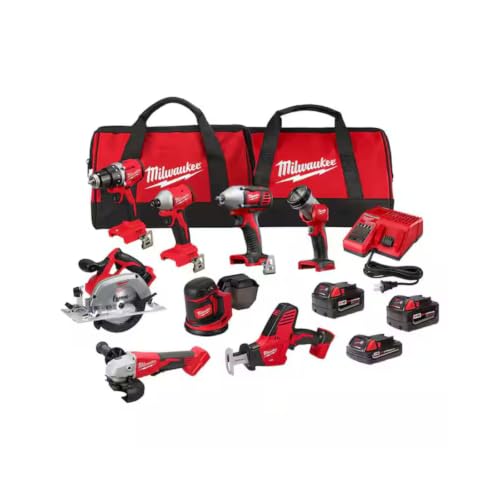
Milwaukee M18 18V Cordless Power Tool Combo Kit, 8-Tool Set, 3 Batteries, 2 Tool Bags, Charger Included
- Complete 8-Tool Set: Hammer drill, impact driver, saw, grinder, reciprocating saw, multi-tool, work light
- Includes 3 Batteries: Two high-capacity and one compact battery
- M18 Lithium-Ion System: Consistent power and extended runtime
As an affiliate, we earn on qualifying purchases.
Step 1: Ensure Proper Connection
- Unplug the charger from power and remove the battery.
- Inspect the battery contacts and charger port for dirt, debris, or corrosion.
- Clean contacts gently with a dry cloth or a brush if needed.
- Reconnect the battery securely and plug the charger back in.
Step 2: Check Battery Condition
Test the battery with another compatible Milwaukee charger if available. If the blinking persists, the battery may be faulty or degraded. Consider replacing the battery with a genuine Milwaukee model, such as the Milwaukee 48-11-1850R 5.0 Ah XC Extended Capacity Resistant Battery.
Step 3: Verify Charger and Power Source
- Ensure the power outlet is working by plugging in another device.
- Try a different outlet or power strip to rule out power issues.
- Inspect the charger for any visible damage or overheating signs.
Step 4: Allow Cooling and Reset
If the charger or battery feels hot, disconnect and let them cool down for at least 15-30 minutes before retrying. Sometimes, overheating causes the red blinking as a safety measure.
Step 5: Test with a Different Battery or Charger
If possible, test with a known good battery and charger. If the red blink persists on a different setup, the charger may be defective and require professional repair or replacement.
The Products in This Guide

Milwaukee M18 18V Cordless Power Tool Combo Kit
- ✔ Voltage: 18V
- ✔ Number of Tools: 8
- ✔ Battery Capacity: High-capacity and compact options

Milwaukee Shockwave 100pcs Impact Driver Bit Set Packout
- ✔ Pieces: 100
- ✔ Case: Packout
- ✔ Material: Steel
Milwaukee M18 18V Cordless Power Tool Combo Kit
The Milwaukee M18 18V Cordless Power Tool Combo Kit offers a complete set for construction, remodeling, and maintenance tasks. With robust tools and high-capacity batteries, it’s designed for demanding jobsites.
Pros:
- Includes 8 tools for versatile tasks
- 3 batteries for extended runtime
- Fast charger minimizes downtime
- Heavy-duty tool bags for organization
Cons:
- Initial investment is high
- Heavy weight for prolonged use
- Battery management requires care
Best for: Professional contractors and serious DIYers
Not ideal for: Casual users or light tasks
Bottom line: A comprehensive, durable kit ideal for demanding projects.
Milwaukee Shockwave 100pcs Impact Driver Bit Set Packout
The Milwaukee Shockwave 100pcs Impact Driver Bit Set Packout offers a wide range of impact-rated bits in a rugged case, perfect for professional and DIY use.
Pros:
- Wide variety of bits
- Impact-rated for durability
- Organized case
- Compatibility with Milwaukee tools
Cons:
- Bulkier case might be heavy
- Set may include more bits than needed
- Impact driver not included
Best for: Heavy-duty impact drivers and demanding projects
Not ideal for: Light-duty or occasional use
Bottom line: A versatile set that enhances your impact driver performance.
Frequently Asked Questions
Why is my Milwaukee charger blinking red?
A blinking red light typically indicates a fault, such as overheating, a bad connection, or a faulty battery. Follow troubleshooting steps to identify and fix the issue.
Can I use a non-Milwaukee battery with my charger?
It is recommended to use genuine Milwaukee batteries and chargers to ensure compatibility and safety. Non-original parts may cause malfunction or damage.
How long does it take to charge a battery?
Using the included rapid charger, a high-capacity battery like the 48-11-1850R can take approximately 60 minutes to fully charge.
Is it safe to continue using a charger with a blinking red light?
No, a blinking red light indicates a potential fault. Continuing to use it may cause damage or safety hazards. Troubleshoot and fix the issue before resuming.
Power Up Safely and Troubleshoot Effectively
Addressing a blinking red light on your Milwaukee charger involves checking connections, evaluating the battery condition, verifying power sources, and allowing cooling time if overheating. Always use genuine parts and follow safety procedures to keep your power tools functioning optimally. If issues persist, consult professional repair services or contact Milwaukee support for assistance.
Affiliate disclosure: As an Amazon Associate we earn from qualifying purchases. Prices and availability are accurate as of the time of publishing.