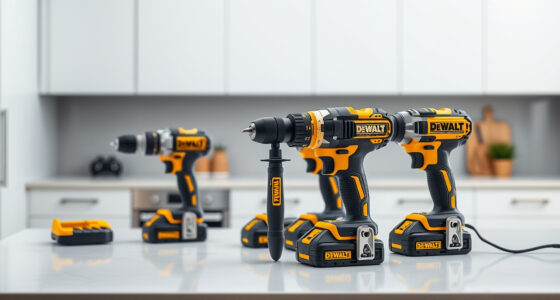

Getting your new DEWALT power tools ready for use is straightforward when you follow proper setup procedures. Ensuring safety and correct assembly helps you get the most out of your tools and extend their lifespan. This guide walks you through the essential steps to set up your DEWALT 20V MAX Cordless Drill Driver Set and accessories effectively.

Get business pricing on tools and workshop supplies
- Business-only prices and quantity discounts
- Tax-exempt purchasing
- Multiple users, one account, clear invoices
Whether you’re a DIY enthusiast or a professional, following these instructions will help you operate your power tools safely and efficiently from the start.
Key Takeaways
| Safety First | Always wear safety gear and read instructions before setup. |
| Proper Charging | Use the recommended charger and fully charge batteries before use. |
| Correct Assembly | Ensure the drill bits are properly secured in the chuck. |
| Battery Handling | Insert batteries correctly and avoid contact with metal objects. |
| Testing Before Use | Test the tools on a scrap material to verify proper setup. |
Unboxing and Initial Inspection
- Carefully remove the drill set and accessories from the packaging.
- Inspect all components for damage or missing parts, including the drill, batteries, charger, and bits.
- Read the user manual to familiarize yourself with safety instructions and features.
Charging the Batteries
- Insert the DEWALT 20V MAX batteries into the charger, ensuring correct alignment.
- Connect the charger to a power outlet and wait until the LED indicator shows full charge.
- Charge both batteries fully before initial use to maximize runtime.
Assembling the Drill
- Insert the fully charged battery into the base of the drill until it clicks securely.
- Attach the desired drill bit into the single-sleeve ratcheting chuck, turning it clockwise until tight.
- Ensure the bit is firmly secured to prevent slipping during operation.
Testing and Adjustments
- Turn on the drill by pressing the trigger and test it on a scrap piece of material.
- Adjust the speed setting if necessary, using the 2-speed transmission for different tasks.
- Use the LED light for better visibility in dim spaces.
Safety Tips & Maintenance
- Always wear safety goggles and gloves when operating the drill.
- Keep your work area clean and free of obstacles.
- Regularly check the drill and batteries for wear or damage.
- Store tools and batteries in a dry, secure place out of reach of children.
The Products in This Guide

DEWALT 20V MAX Cordless Drill Driver Set
- ✔ Length: 7.6 inches
- ✔ Weight: 3.4 lbs
- ✔ LED Light: Yes

DEWALT Drill Bit Set
- ✔ Tip Size Range: 1/16 to 3/8 inch
- ✔ Shank Size: 3-flats
- ✔ Coating: Rust-resistant
DEWALT 20V MAX Cordless Drill Driver Set
The DEWALT 20V MAX Cordless Drill Driver Set offers a compact, lightweight design with a brushless motor, making it ideal for a variety of tasks in tight spaces. Its ergonomic handle and LED light enhance usability and visibility.
Pros:
- Brushless motor for longer run time
- Compact and lightweight
- LED work light
- 2-speed transmission
Cons:
- Battery life may vary with heavy use
- Charger not included in all packages
Best for: General-purpose drilling and fastening in tight or confined spaces
Not ideal for: Heavy-duty industrial applications requiring more power
Bottom line: A reliable, versatile drill suitable for most home and professional projects.
DEWALT Drill Bit Set
This 14-piece DEWALT drill bit set features high-speed steel bits with a 135-degree split point, perfect for drilling into plastic, wood, and metal. Its durability and precision make it a great addition to your toolkit.
Pros:
- Durable high-speed steel
- Anti-walking split point tip
- Corrosion-resistant coating
- Easy size identification
Cons:
- Limited to bit sizes included
- Not suitable for heavy industrial use
Best for: General-purpose drilling in various materials
Not ideal for: Heavy-duty or high-torque applications
Bottom line: A versatile drill bit set that enhances your drilling precision across materials.
Frequently Asked Questions
How do I change the drill bit on my DEWALT drill?
Loosen the single-sleeve ratcheting chuck by turning it counterclockwise, remove the old bit, insert the new bit fully into the chuck, and tighten by turning the chuck clockwise until secure.
How should I store my DEWALT batteries?
Store batteries in a cool, dry place away from metal objects. Use the charge indicator to check their condition regularly and avoid keeping batteries in extreme temperatures.
Can I use third-party accessories with my DEWALT drill?
While some third-party accessories may fit, it’s best to use DEWALT-approved parts and accessories to ensure safety and optimal performance.
Start Your DIY Projects with Confidence
Setting up your DEWALT power tools properly is essential for safe and effective operation. By following these steps, you ensure your tools are ready for any task, from simple repairs to more complex projects. Remember to prioritize safety, use quality accessories, and keep your tools maintained for long-lasting performance.
Affiliate disclosure: As an Amazon Associate we earn from qualifying purchases. Prices and availability are accurate as of the time of publishing.
Halloween Picks
halloween
As an affiliate, we earn on qualifying purchases.